Replays
Every finished game in gorge can be replayed from its log, event by event. The engine is deterministic, so a replay is not a recording of the screen: it rebuilds the game from the seed, the decks and the list of answers each player gave. This page covers watching a replay, moving through one, and, on a review server, reading every decision the game posed: the options on offer, the one that was chosen and, for a bot that searches, what it considered and why it picked what it did.
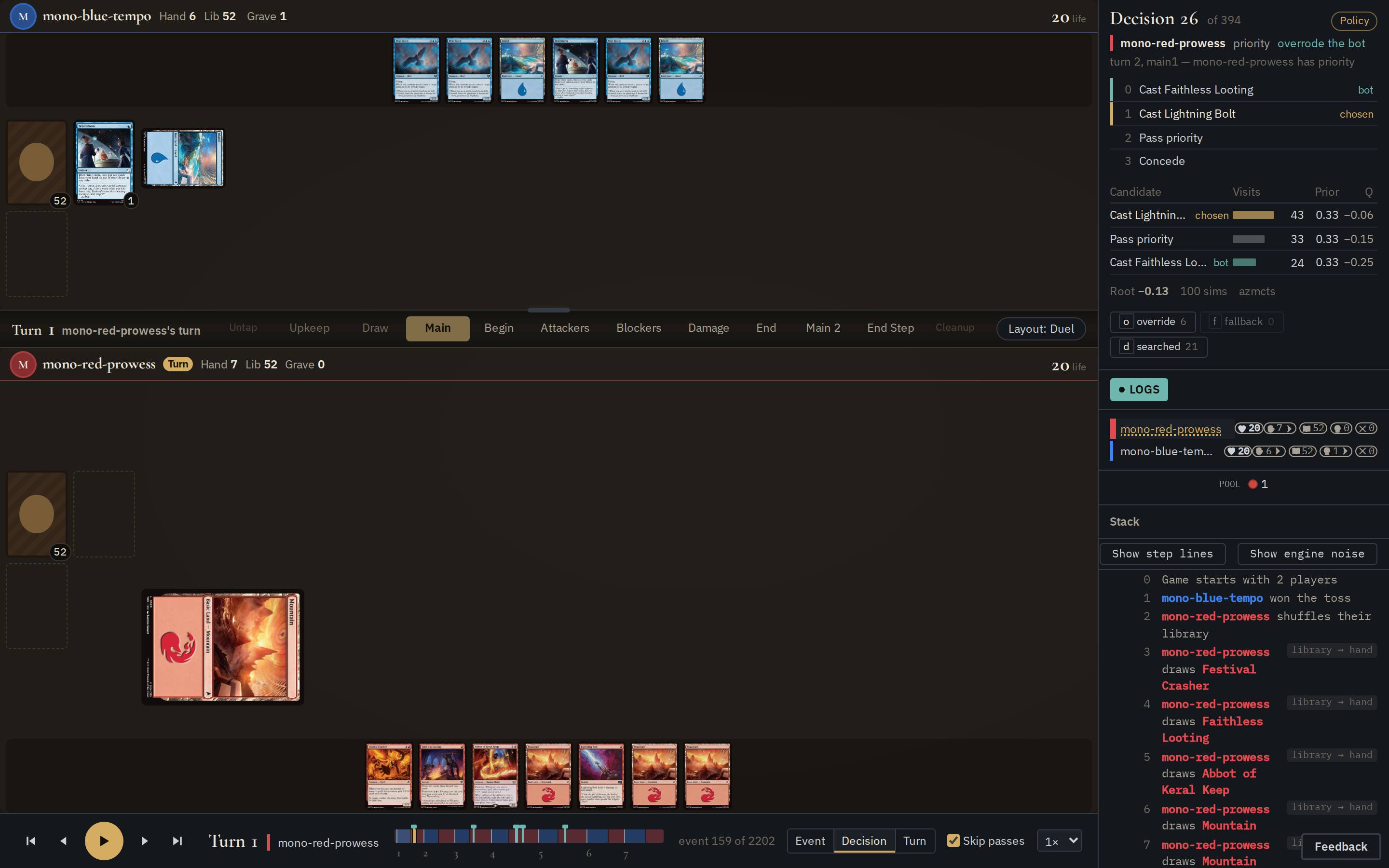
- Board
- The game as it stood at the cursor. A replay is a spectator's view, so the
server decides whose hands you see: the operator's
-spectatorsetting on an ordinary server, and every hand on a review server. - Decision panel
- Only on a review server. The decision at the cursor: who was asked, every option offered, which one they chose and, when the record carries notes, how they chose it. See Reading a decision.
- Seats and stack
- Life, hand, library and graveyard counts for each player, the mana pool, and the stack with the last resolved card.
- Log
- The game's event lines up to the cursor. Show step lines and Show engine noise add the lines the log hides by default.
- Transport
- Play, step and scrub through the game. See Moving through a game.
Open a replay
There are two places a replay comes from. Any gorged server keeps one for
each match it finished, and gorged review serves games you saved.
| A finished match on a server | gorged review |
|
|---|---|---|
| Where | /t/<table>/m/<k>, linked from the table's match list |
/t/<id>/m/1 for each game you pass it |
| Hands shown | as the server's -spectator flag says (hidden by default) |
all of them |
| Decision panel, skip passes, jump keys | no | yes |
| Bot reasoning | no | when the game was recorded with notes |
From a running server
Open the table in the lobby and pick a finished match, or go straight to
/t/<table>/m/<k>, where k counts the table's matches from 1. A live
table's spectator view has the same transport with one extra button: Live
while you follow the game as it happens, Go live (with how far behind you
are) after you step back. See
Spectating and replays for the spectator
flags.
Review a saved game
gorged review is a separate, read-only mode of the server. It takes one or
more saved games and serves each one as a table you can only watch:
gorged review: 1 recorded games on http://127.0.0.1:8090/
gorged review: 20260914T120000Z-fb01 at http://127.0.0.1:8090/t/20260914T120000Z-fb01/m/1
That input is the bug report committed in the repository. A saved game is either:
- a feedback snapshot: the directory a player's bug report writes
(
match.json,log.json), see Reporting a bug from a game; - a match record: one
<id>.match.json.gzfile, written by a bot-game driver as below. Only a record can carry the bots' notes.
The table id is the input's file or directory name. Pass several inputs as
arguments or with -records a,b,c. The server replays every input when it
starts and refuses to start if any one fails to load or replay, so a game
that diverges is reported instead of quietly left out.
| Flag | Default | What it does |
|---|---|---|
-addr |
127.0.0.1:8090 |
listen address. It must be a loopback address unless you also pass -review-public |
-review-public |
off | allow any address. Every hidden card in every game becomes readable by anyone who can reach the port |
-art-dir |
none | fetch card images into this directory and serve them. Without it the board draws no art and nothing is written to disk |
-records |
saved games, comma-separated; repeatable; positional arguments work too |
A review table has no seats: nothing can be played at it, and every seat
route answers 403.
Record games for review
A match record is written by whatever plays the games. In gorge that is
testkit/bench, the driver behind bot-vs-bot games: give
its Hooks.Record a sink and it writes one record per game. While a sink is
set, the driver also asks each seat that can explain its decisions to do so
(the search bots and the policy-net bot can) and stores the answers in the
record.
hooks := bench.Hooks{EnvSeats: true}
hooks.Record = &matchrecord.Sink{
    Producer: matchrecord.Producer{Tool: "my-run", Policies: []string{"az-redeal", "heuristic"}},
    Put: func(r *matchrecord.Record) error {
        return matchrecord.Write(filepath.Join(dir, name+matchrecord.Ext), r)
    },
}
outcome, eng, err := bench.PlayGame(cfg, seats, 60, 6000, hooks)
Put decides where each record goes and which games to keep. With no sink
the driver records nothing and asks the seats for nothing: a run without
Hooks.Record costs exactly what it did before. A two-player record is
10 to 20 KB gzipped, and the notes add about 1 KB of that.
To try it without writing a driver, one test writes three example records (a search bot against the heuristic, twice, and a rollout search against the heuristic):
GORGE_EXPLAIN_DEMO_DIR=/tmp/gorge-records \
  go test -run TestWriteExplainDemoRecords -v ./testkit/bench
go run ./cmd/gorged review -art-dir /tmp/gorge-art \
  /tmp/gorge-records/*.match.json.gz
It takes about 8 seconds and plays the same three games every time. The
screenshots on this page come from the first one, az-redeal-vs-bot.
Moving through a game
The transport runs across the bottom of the board.
From left to right:
- Play and step. The outer buttons jump a whole turn back or forward. The inner ones step one unit, and the round button plays and pauses. Pressing play at the end of the game starts it again from the beginning.
- Turn and active player. The turn number is the round, the same "Turn N" the phase bar shows, so in a two-player game turn 3 holds each player's third turn. Before the first turn it reads Setup.
- Timeline. One band per turn, tinted with the active player's colour, with the round number under each round's first turn. Click or drag to move, and hover to see the turn and the event under the pointer. On a review server, ticks mark the decisions worth a look: green where a bot overrode its own heuristic, ember where a fallback answered. Hover a tick for which decision it is.
- Position. The cursor as an event number, out of the game's total.
- Step by. What one step moves. See the table below.
- Skip passes. Only on a review server, and only while stepping by Decision. See Skip passes.
- Speed. ½×, 1×, 2×, 4× or 8×.
| Step by | One step moves to | One play step at 1× |
|---|---|---|
| Event | the next or previous logged event | 0.15 s |
| Decision | the next decision a player was asked. The board shows it as they faced it, before their answer | 0.7 s |
| Turn | the start of the next or previous turn | 1.8 s |
Decision is the default, because it is the unit a game is played in: each stop is one moment where a player or a bot had to choose.
Keys
| Key | Does |
|---|---|
| Space or K | play or pause |
| → and ← | step one unit forward or back |
| Shift+→ and Shift+← | step one turn |
| PageDown and PageUp, with the timeline focused | step one turn |
| Home and End, with the timeline focused | the start and the end of the game |
| O, F, D (review server) | the next override, fallback or searched decision. Shift goes to the previous one |
The keys do nothing while you are typing in a field.
Skip passes
Most decisions in a game are a priority window with nothing to do: the only options are Pass priority and Concede. In the example game 259 of its 395 decisions are like that. On a review server the transport knows every decision's options, so with Skip passes on (the default), a Decision step and Decision playback pass over those and stop only where a player had a real choice.
The setting is remembered by your browser. It changes only where a step lands: Event and Turn steps, the timeline, the jump keys and a link to a pass-only decision still reach every decision. A replay on an ordinary server has no option lists, so it has no Skip passes box and stops at every decision.
Links to a moment
The address bar follows the cursor, so copying the URL shares the exact moment, along with the step unit and speed when they are not the defaults. You can also write a link by hand:
| Parameter | Opens at |
|---|---|
?seq=159 (or ?event=) |
event 159 |
?intent=26 (or ?decision=) |
decision 26, as the player faced it. This is the same point go run ./cmd/repro -at 26 prints for a bug report |
?turn=4 |
the start of turn 4, counted as the transport counts turns |
?unit=event, decision or turn |
with that step unit |
?speed=0.5, 1, 2, 4 or 8 |
at that speed |
?play=1 |
already playing |
If a link names more than one position, seq wins, then intent, then
turn. A link with no position opens at the end of the game.
Reading a decision
On a review server the top of the rail is the decision panel. It always shows the decision at the cursor or the last one before it. Between two decisions (while stepping by Event, say) it keeps the last one, dimmed.
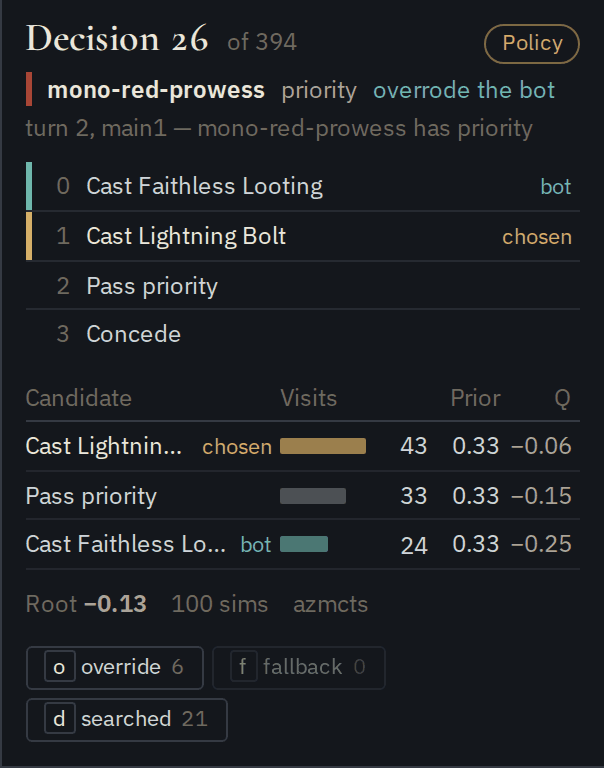
Heading. Decision 26 of 394 is its index from 0, the number ?intent=
and repro -at take. The badge at the right says who answered, as
described below. It is there only when the record
carries notes.
Who and what. The player, with their colour, and the kind of decision (priority, attackers, target, choose and so on), then the engine's prompt. overrode the bot appears when a bot chose differently from its own heuristic.
Options. Everything the player could have answered, numbered as the engine numbered them. The answer has a gold edge and chosen. On an override, the heuristic's answer has a green edge and bot. A decision with more than 64 options lists the first 64 and says how many there were. When the answer is not a single option (several attackers, a cast with an {X} value) an Answer line spells it out.
Search. Shown when the bot searched. See Reading the search.
Jumps. How many overrides, fallbacks and searched decisions the game has, and buttons (or O, F and D) to go to the next one.
A record saved without notes, and every feedback snapshot, still shows the options and the answer for every decision. The panel then says No explain recorded and has no badges, ticks or jumps.
Who answered
A seat is not always the one that picked the answer. A search bot hands some decisions to its heuristic, and when something goes wrong a fallback answers instead. The badge tells you which happened.
| Badge | Meaning |
|---|---|
| Policy | the bot's search or network chose the answer |
| Heuristic | the seat's heuristic answered: a plain heuristic seat, or a kind of decision the bot does not search. A Reason line says why when a search bot fell back to it at a kind it does search |
| Forced | not searched, because there was only one answer the search could express. Often a pass-only window, but not always: a land drop or a mana tap the search cannot represent counts here too |
| Prior skip | too many options for the network to rank, so the search ran over the first candidates with equal priors. It still searched, and the panel still shows the table |
| Feed fallback | the bot's view of the game had stopped updating, so the driver answered for it |
| Root fallback | the search could not start from this position (the Reason line says why), so the driver answered for it |
| Refusal retry | the engine refused the bot's first answer and accepted its second |
| Refusal fallback | the engine refused the bot's answer and a shared fallback answered. The tooltip says which rung of the fallback ladder |
The last four are fallbacks: the F key and the ember ticks find them. A fallback keeps the search the bot ran, so you can see what it wanted even though that is not what was played.
Reading the search
The table lists the candidates the search considered at the root, most visited first: up to 16, plus the chosen and the heuristic's answer if they fall outside the top 16 (N more not listed counts the rest).
| Column | Meaning |
|---|---|
| Candidate | the answer, in the options' words. Two options with the same name get their number added |
| Visits | how many simulations went through this candidate. The search spends its time on the answers that look best, so visits are its real preference. The bar is scaled to the most-visited row |
| Prior | how promising the network rated the candidate before searching |
| Q | the average result of those simulations, for the player deciding, from −1 (a sure loss) through 0 (even) to +1 (a sure win) |
Under the table: Root is the search's value of the position as a whole on the same scale, then the number of simulations, the time it took when the driver measured it, and the search engine. A bot that only scores the options with a network, without searching, shows Net value instead.
In the example, all three candidates started with the same prior of 0.33, so the search had no preference going in. After 100 simulations Lightning Bolt had 43 visits and a value of −0.06, close to even. Passing scored −0.15, and Faithless Looting, the heuristic's choice, scored −0.25 and got the fewest visits. The root value of −0.13 says the search thought the red player was slightly behind either way; it preferred the Bolt because that lost the least.
Finding the interesting decisions
A game of a few hundred decisions has only a handful worth reading closely. The quickest way through one is:
- Press O to go to the next override, a decision where the bot disagreed with its own heuristic. These are where the search changed the game. Compare the chosen and bot rows of the table.
- Press F for the next fallback. Many fallbacks in one game usually mean the bot stopped working properly there, rather than that it played badly.
- Press D to walk every searched decision, including the ones where search and heuristic agreed.
The ticks on the timeline show the same overrides and fallbacks at a glance, so a cluster of them stands out before you step anywhere.
What the notes can and cannot tell you
- An override is measured against the bot's own heuristic, not against the best move. It shows where the search changed the answer, not whether the change was right. A set answer (attackers, blockers) counts as the same if it has the same members; an ordered one (trigger order, arranging cards) only in the same order.
- Values are the deciding player's, so in a two-player game the same position reads +0.4 for one player and about −0.4 for the other. They are rounded to three decimals and shown to two.
- Visits matter more than Q. A candidate the search barely visited can have a high Q from a few lucky simulations. The search picks by visits.
- The time column is wall-clock time on the machine that played the game. It is never part of the replay, and two runs of the same game agree on everything else.
- Notes do not change the game. They are stored beside the log, are never replayed and never hashed. A record whose notes do not line up with its decisions is still served, without notes, with a warning in the server's output.
Limits
- Only a review server has the decision panel, Skip passes, ticks and jump keys. An ordinary server's replays have the board, log and transport.
- The decision index loads in one piece, which is fine for a game of a few thousand decisions.
gorged reviewserves only games played by the gorge engine. A record from another engine that carries its own random draws is refused at startup.