Play in the browser
This page is for people who want to play: against gorge's bots, against
friends, or both, in a browser. It covers starting the gorged server, what
each screen of the client does, the flags that shape tables, decks and bots,
filing a bug report from a game, and the security you do (and do not) get if
you open the server to a network. It assumes you finished
Install and build, including the browser client build.
The commands and responses on this page were run against gorged built from
commit 513a2a0c3 on 2026-10-21; the screenshots are from 2026-10-20.
Play against a bot in five minutes
go run ./cmd/gorged -addr 127.0.0.1:8090 -dir /tmp/gorge-play \
  -feedback /tmp/gorge-play-feedback -vsbot
gorged: 4 tables of 4 on 127.0.0.1:8090 (dir /tmp/gorge-play)
gorged: art prewarm: 1124 distinct card names from testkit/testutil/decks
Leave it running in that terminal; Ctrl-C stops it.
Open http://127.0.0.1:8090/. The lobby lists the bot-only tables the server
is running and, because of -vsbot, a Play 1v1 vs a bot panel:
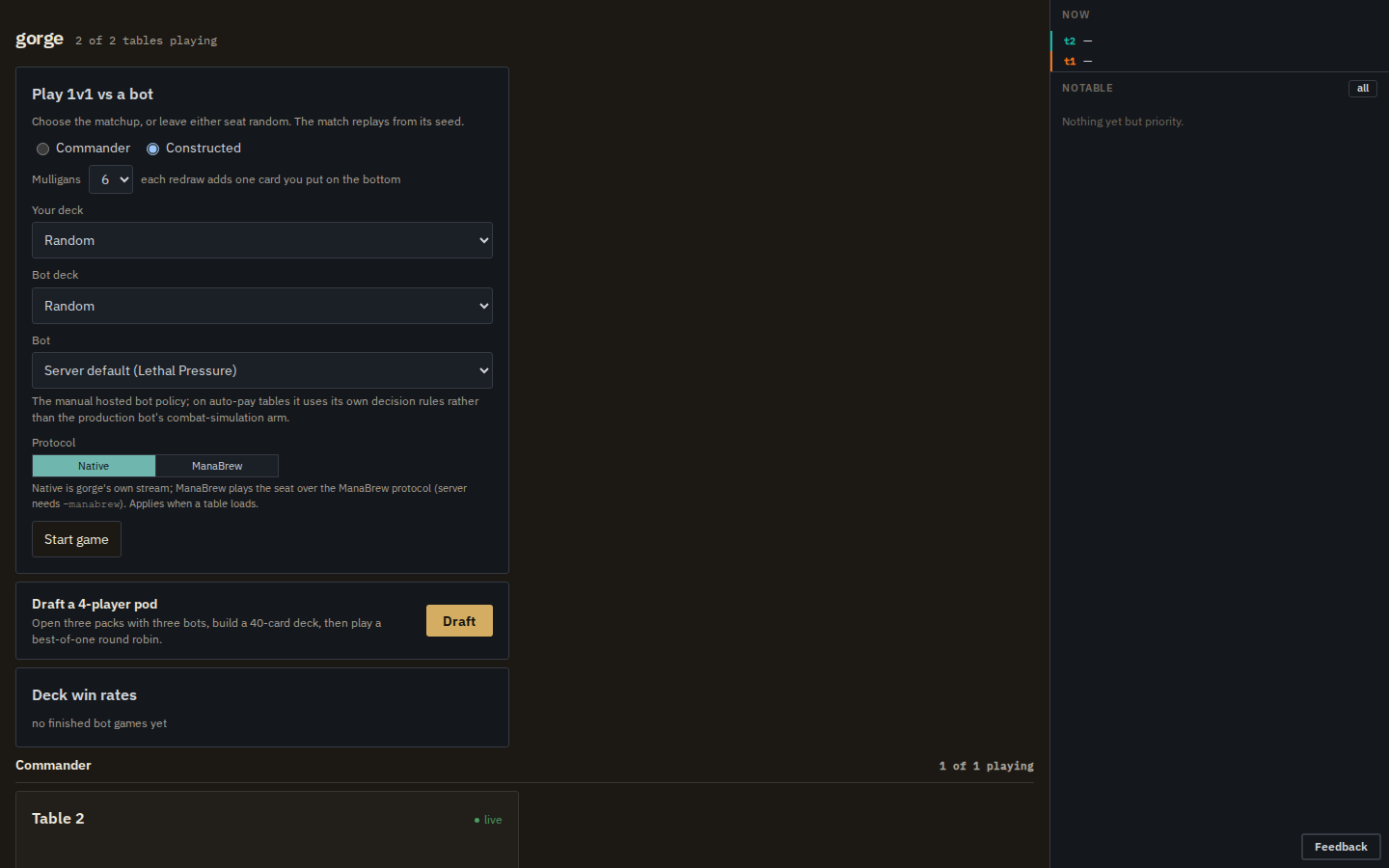
/. Headless capture, 2026-10-20.Pick a format, your deck, the bot's deck (or leave either on Random) and a
bot, then Start game. The browser asks the server for a fresh private
table (POST /api/games), receives a seat token, and moves to that table's
join URL, /t/g1?seat=0&token=…. The game starts with the mulligan decision.
Why each flag in that command:
-vsbotarms the play-vs-bot panel. Without it the server is spectator-only: you can watch bot tables but nothing can sit down.-addr 127.0.0.1:8090listens on loopback only. The default,:8080, listens on every interface; see On a network.-diris the persistence directory. Give each server its own (why).-feedbackis where bug reports go. Its default isfeedback/in the current directory, which is not gitignored, so point it outside your checkout.
The server also fetches card images from Scryfall and
caches them under <dir>/art. At startup it prewarms that cache for every
card in every deck (1,124 names with the built-in decks), at a polite pace,
in the background. A line such as
art: named lookup Amulet of Vigor: 429, retrying in 1m0s means Scryfall
asked it to slow down; it backs off and retries, and missing art never blocks
a game. Pass -prewarm=false to make no outbound requests until a page asks
for an image.
The table
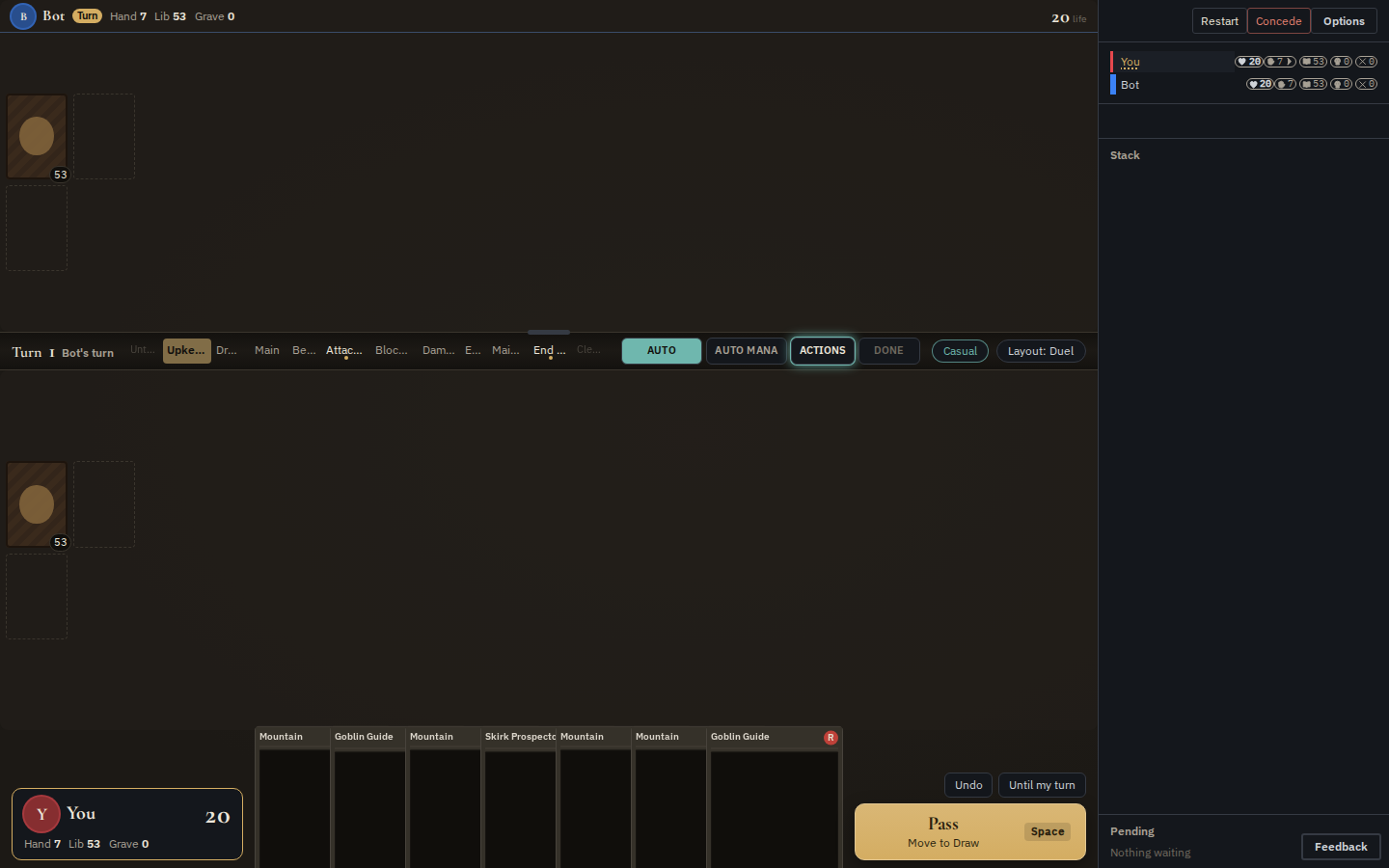
/t/g1?seat=0&token=… on turn 1 (card art not yet cached in this capture).| Region | What it does |
|---|---|
| Seat headers | name, life, hand/library/graveyard counts; graveyard and exile piles open on click |
| Centre strip | the turn and the phase track (click a step to set a stop there), the AUTO (auto-pass), AUTO MANA (use a suggested mana plan when casting), ACTIONS (every option on offer) and DONE (submit a multi-pick) buttons; drag it to resize the opponents' share of the screen |
| Hand | cards rise on hover; a card with something on offer has a coloured ring and a CAST or PLAY button. Battlefield cards offer their abilities the same way |
| Action cluster | the big button says what passing will do (Pass — Move to Draw); above it Undo, Resolve all while the stack is live, and End turn / Until my turn |
| Rail | players, the stack (with per-card "always pass" yields), the pending decision, the game log, and Restart, Concede, Options |
| Prompt dock | targets, modes, attackers and blockers, scry/surveil arrangement, discard, library search, naming a card, and the mana payment panel when you pay by hand |
Attacks and blocks are made by clicking creatures on the board; the dock offers Attack with all, No attack and No blocks. Concede, Restart (a new game with the same decks and bot and a fresh seed) and Undo each ask for confirmation or have their own rules, below.
Default keys (rebindable in Options → Keymap; ? shows the sheet):
| Key | Action | Key | Action |
|---|---|---|---|
| Space | pass priority once | 1–9 |
pick option N |
| Enter | end turn | Shift+A | attack with all |
| Shift+Enter | skip the rest of the turn | Shift+N | no blocks |
| Esc | stop a run of passes | Shift+P | auto-pay |
| Ctrl+Shift+Z | undo | L |
show or hide the log |
| Ctrl+Shift+O | options | Z |
zoom the card under the pointer |
Options sets how much the client passes for you: presets (Casual, the default; No tells; Full control), which opponent actions stop you, a per-step stop grid for your turn and the opponent's, trigger auto-ordering, a step delay, and the board layout. Settings live in your browser's local storage, per browser.
The source of all this is web/src:
the lobby is routes/Overview.svelte, the table routes/Table.svelte, the
keymap lib/keymap.ts.
Mulligans and mana
A vs-bot game asks for the London mulligan allowance in the lobby (0 to 6;
the panel defaults to 6). Startup tables use -mulligans (default 1; 0 skips
the pregame round).
By default the server offers automatic mana payment plans to human seats
(-auto-mana, on by default): CAST pays with a suggested plan, and the
ACTIONS menu and the payment panel let you tap by hand instead. Bots use the
same plans (-bot-auto-mana, on by default).
Undo
Undo rolls the live match back to the decision you last answered, so pressing it repeatedly walks back one of your own actions at a time. The bots then re-decide from there. Two rules come with it:
- Undo is refused at a table with more than one human: there is no way to ask the other player's consent.
- The rewind replays the same seed, so a shuffle you undo past comes back in
the same order. After an undo you can know your next draws. That is an
accepted trade for casual play; reseeding would break replay
(
server/host/undo.go).
Spectating and replays
Anyone who opens a table without a seat token is a spectator. Spectators get
a DVR bar to scrub back through the match (step, pause, a slider with turn
ticks, back to live), and the log is open by default. Each finished match
has a frozen replay at /t/<table>/m/<k>, linked from the table's match list.
Replays covers the transport, its keys and links, and
gorged review, which adds every decision and the bots' reasoning.
How much a spectator sees is the server's choice, never the client's:
| Flag | Default | Applies to |
|---|---|---|
-spectator public\|omniscient |
public (hands hidden) |
the startup tables t1…tN, including a -humans table |
-vsbot-spectator public\|omniscient |
public (hands hidden) |
the on-demand play-vs-bot tables |
Play against other people
A human-vs-human (or mixed) game uses table t1 of the startup tables:
-humans names which of its seats are people, and the rest are bots.
go run ./cmd/gorged -addr 127.0.0.1:8090 -dir /tmp/gorge-pvp -feedback /tmp/gorge-play-feedback \
  -tables 1 -seats 2 -humans 0,1 -spectator public -prewarm=false
gorged: 1 tables of 2 on 127.0.0.1:8090 (dir /tmp/gorge-pvp)
gorged: table t1 seat 0 joins at http://127.0.0.1:8090/t/t1?seat=0&token=355b74faa5e846cd7071dc95e1cff758
gorged: table t1 seat 1 joins at http://127.0.0.1:8090/t/t1?seat=1&token=9579ac2e8bcbdd267ded59a62195d63e
Send each player their own line. Each token is random per start, grants
exactly one seat at one table, and is the only credential there is. For
local testing, -seat-token devtoken fixes seat 0's token to devtoken and
the next human seat's to devtoken-1.
Showing every hand is opt-in
-spectator defaults to public, so anyone who opens /t/t1 without a
token, including either player in a second tab, sees only the public
view. Pass -spectator omniscient to show every hand; do that only
when every watcher is trusted, never on a table with people at it.
Things to know about human tables:
- One browser tab plays one seat. The seat comes from the URL when the page loads; there is no hot-seat switching inside a tab. To play both seats on one machine, open each join URL in its own tab or window.
-humansapplies tot1only, and makes it single-match (not perpetual).- Seats
-humansdoes not name are bots, using-bot-policy. A 4-seat Commander pod with two people and two bots is-format commander -seats 4 -humans 0,1. - There is no turn clock: a human seat waits for its answer indefinitely.
- Undo is off (more than one human).
Tables, formats, decks and seats
gorged runs -tables perpetual bot-only tables (t1…tN) alongside any
play-vs-bot games. They are the "watch the bots play" half of the lobby, and
the deck win-rate board is computed from their finished
games.
| Flag | Default | Meaning |
|---|---|---|
-tables N |
4 | startup tables; 0 runs only play-vs-bot games |
-seats N |
4 | seats per table, 1 to 8 |
-format list |
constructed |
comma-separated constructed, commander; table i takes formats[(i-1) mod n], so -format commander,constructed alternates |
-commander-seats N |
0 (= -seats) |
seat count of the commander tables only, e.g. 2-seat constructed beside 4-seat pods |
-seed S |
1 | seed of t1; table i uses S+i-1, and match k of a table derives its seed from that |
-pace D |
50ms | sleep after every decision on bot tables; 0 is flat out, 1.5s is watchable |
-cooldown D |
5s | pause between matches on a perpetual table |
-perpetual |
true | start a new match when one ends |
-mulligans N |
1 | London mulligans per player before turn 1 |
-decks dir |
testkit/testutil/decks |
the deck JSON files every table and the lobby deal from |
Play-vs-bot games are always two seats, one human and one bot, in either
format; -max-on-demand-tables (default 32) caps how many the process keeps.
Decks
The built-in directory holds 30 decks: 15 sixty-card constructed decks and 15
Commander decks (GET /api/decks lists them with format, archetype and
commander). The server splits whatever directory you give it into two pools by
one rule: a file that names a commander is a Commander deck, everything
else is constructed. Each Commander deck is validated at startup, and a card
the corpus cannot resolve stops the server before it listens.
To play your own list, convert it with cmd/deckimport, which reads the usual
"4 Lightning Bolt" export format (drops the sideboard, turns a Commander
section into the commander field) and reports any card the corpus lacks:
mkdir -p /tmp/mydecks
go run ./cmd/deckimport -in /tmp/burn.txt -out /tmp/mydecks/my-burn.json -name "My Burn" -archetype burn
== My Burn (custom) ==
cards:   60   resolved: 60   (100.0%)
sideboard cards dropped: 2
all cards present in corpus
written: /tmp/mydecks/my-burn.json
-decks replaces the built-in pool rather than adding to it, so copy the
built-in files in too if you want both:
cp testkit/testutil/decks/*.json /tmp/mydecks/
go run ./cmd/gorged -addr 127.0.0.1:8090 -dir /tmp/gorge-mine -feedback /tmp/gorge-play-feedback \
  -decks /tmp/mydecks -tables 0 -vsbot
The new deck then shows in the lobby's pickers under its file name
(my-burn). "Present in the corpus" means every card has a Forge script, not
that gorge implements every ability on it: Card sets
shows what is supported.
Bots at the table
Every bot seat on a server runs a registered policy (a named bot
strategy; see Bot-vs-bot games for the
list). Policies run inside the gorged process, deterministically from the
match seed.
| Flag | Default | Meaning |
|---|---|---|
-bot-policy name |
lethal-pressure |
the policy of every bot seat on the startup tables, and of a play-vs-bot game that names none |
-bot-policies a,b,… |
empty = all eligible | the set the lobby offers (GET /api/bot-policies) |
-bot-common-sense |
off | a guard that drops removal aimed only at the bot's own permanents and answers the mulligan with the constructed rule (read by bot and sb-tactical) |
-bot-search-slots N |
GOMAXPROCS/2 | concurrent searched decisions across the process (search policies queue, never degrade) |
-max-search-tables N |
8 | live play-vs-bot tables whose bot is a search policy |
-sb-agent name=/path |
register an external stdio bot as a policy (External bots) |
Two policies, sb-tactical and az-redeal, build their search or scoring
from every seat's real decklist, so the server never seats them against a
human. Naming one in -bot-policies is refused at startup:
gorged: -bot-policies: bot policy "sb-tactical" reads opponents' decklists and cannot be offered: POST /api/games always seats a human
Per-policy options use -bot-opt <policy>.<key>=<value>,
-bot-config <policy>=<file.json> or the environment variable
GORGED_BOT_<POLICY>_<KEY>, in that order of precedence. No built-in policy
declares any options today, so the mechanism exists for policies you add;
an option a policy does not declare is an error:
A few flags host trained-network bots whose weight files are not distributed
with gorge (gorged -h lists them); without the files they do nothing.
-events (draft pods) needs an extension that the public gorged
binary does not link, so the lobby's Draft button does not work on a plain
build. -manabrew mounts an adapter for a third-party client protocol; leave
the lobby's Protocol switch on Native.
Persistence and restarts
-dir (default gorged-data) holds tables.json and every match's event
log. On restart the server resumes what is in the directory:
- If
tables.jsonalready has tables, the startup flags that shape tables (-tables,-seats,-format, ...) are ignored. Verified: restarting a 2-table, 2-seat constructed directory with-tables 3 -seats 4 -format commandercame back as the same two 2-seat constructed tables, while the startup line printed2 tables of 4. - A directory written by an older binary resumes with every field that
binary did not know set to its zero value. The zero
Formatisconstructed, a real value, so nothing tells you a-formatwas dropped. - Play-vs-bot games are dropped at restart (their tokens lived only in the
process), but their logs stay under
<dir>/g<N>and their ids are never reused.
One persistence directory per server
Two servers sharing one -dir silently corrupt each other's matches. Give
every server its own directory, and start from an empty one whenever you
change table flags or upgrade the binary.
Reporting a bug from a game
The Feedback button (bottom right of every page) sends your description,
an optional screenshot and some client diagnostics to POST /api/feedback.
The server writes the report under -feedback (default feedback/,
deliberately separate from -dir so wiping state never loses a report). When
the report came from a table, it also snapshots the match:
/tmp/gorge-play-feedback/20261020T173634Z-f0256b83/
  report.json   the text, the page URL, the table and seat
  match.json    the table config and the deck contents
  log.json      the event log at the moment of the report
  view.json     the reporting seat's own redacted view
That snapshot replays exactly. cmd/repro rebuilds the game and prints the
board at the report point:
== feedback report 20261020T173634Z-f0256b83 (table g1, match 1) ==
snapshot: captured: match.json log.json view.json
replayed 4 of 4 recorded intents (34 events); recorded head 7f24e17580718ec6
turn 1, round 1, beginning (step upkeep) — active: seat 1, priority: seat 0
seat 0 You: life 20, library 53, hand 7, graveyard 0, exile 0
seat 1 Bot: life 20, library 53, hand 7, graveyard 0, exile 0
pending: seat 0 priority: turn 1, upkeep — You has priority (2 options)
-list prints the timeline of recorded answers, -at N stops at answer N,
-omniscient shows every hand, and -emit-test <pkg> turns the snapshot into
a failing Go test skeleton. Exit status 0 means the replay matched the
recording event for event. A DIVERGED result is explained in
Troubleshooting.
On a network: what is and is not protected
To let other machines connect, listen on a reachable address, for example
-addr :8090 (all interfaces). The join lines the server prints say
127.0.0.1; replace that with the machine's LAN address when you send them.
Know what that exposes. gorged has no login, no TLS and no rate
limiting. The only credential is the per-seat token in a join URL. Anyone
who can reach the port can:
- list and watch every startup table; hands are hidden by default
(
-spectator public) and visible only when the operator passes-spectator omniscient; - start play-vs-bot games (up to
-max-on-demand-tables) and so spend your CPU; - submit feedback reports, which are written to your disk (size-capped at 12 MiB each).
A seat token travels in the URL query string, so it ends up in browser
history and in any proxy's access log. Feedback reports strip token and
seat_token from the page URL before storing it, but treat a join URL itself
as the credential it is.
For anything beyond a trusted LAN, keep gorged on loopback and put it behind
something that adds authentication and TLS (an SSH tunnel, or a reverse proxy
with a login), and leave -spectator at its public default for human
tables. -pprof
(runtime profiles) is refused unless the listener is loopback, and a proxy in
front of it would expose it anyway.
The HTTP API
Everything the browser does goes through a small JSON API plus a server-sent
event stream, so you can drive or inspect a server with curl. These calls
were made against a running server:
curl -s localhost:8090/api/tables          # startup tables: id, seats, format, state, match, bot_policy
curl -s localhost:8090/api/decks           # the deck catalogue
curl -s localhost:8090/api/bot-policies    # the offered policies and the default
curl -s -X POST localhost:8090/api/games \
  -d '{"format":"constructed","human_deck":"uw-tempo","bot_deck":"mono-red-goblins","bot_policy":"bot"}'
{"table":"g1","match":1,"seed":8554205851668612786,"seat":0,"token":"ab73b10ea419116470f71f92035de933","bot_policy":"bot","join":"/t/g1?seat=0&token=ab73b10ea419116470f71f92035de933"}
| Endpoint | Auth | What it does |
|---|---|---|
GET /api/tables |
none | the startup tables (play-vs-bot tables are not listed) |
GET /api/decks |
none | the deck catalogue |
GET /api/bot-policies |
none | {default, policies}, each with label, description, tier, formats and its recorded strength claim |
GET /api/stats/decks |
none | deck win rates over finished bot-only games (decks with at least min_games) |
POST /api/games |
none (needs -vsbot) |
create a play-vs-bot game: format, optional human_deck, bot_deck, bot_policy, mulligans (0-6) |
GET /api/tables/{t}/matches |
none | a table's matches |
GET /api/tables/{t}/matches/{k}/view?seat=N |
seat token for seat= |
a seat's redacted view, or the spectator view without seat |
GET /api/tables/{t}/matches/{k}/events |
as above | the event log with rendered lines |
GET /api/tables/{t}/matches/{k}/pending?seat=N |
seat token | the decision that seat owes, if any |
POST /api/tables/{t}/matches/{k}/intent |
seat token | answer it: {"seq":…, "player":N, "choices":[i]} |
POST /api/tables/{t}/matches/{k}/undo |
seat token | the Undo button |
GET /api/stream, POST /api/subscribe |
none | the server-sent event stream the client renders from |
POST /api/feedback |
none | a bug report (multipart form) |
The seat token goes in an Authorization: Bearer <token> header (or the
?token= query). Without it a seat-scoped call answers
{"code":"unauthorized","message":"request does not hold a seat claim"}. A
game you create this way can be played entirely with pending and intent;
writing a bot that way is covered in External bots.
All gorged flags
go run ./cmd/gorged -h prints the authoritative list with defaults. Grouped:
| Group | Flags |
|---|---|
| Listening and storage | -addr, -dir, -feedback, -art-dir, -cards, -decks |
| Tables | -tables, -seats, -commander-seats, -format, -seed, -pace, -cooldown, -perpetual, -mulligans, -spectator |
| People | -humans, -seat-token, -vsbot, -vsbot-spectator, -max-on-demand-tables, -auto-mana |
| Bots | -bot-policy, -bot-policies, -bot-opt, -bot-config, -bot-auto-mana, -bot-common-sense, -bot-search-slots, -bot-search-parallelism, -max-search-tables, -sb-agent |
| Card art | -prewarm, -prewarm-art-only, -prewarm-art-budget, -prewarm-art-max-consecutive-failures |
| Optional extras | -pprof, -manabrew, -manabrew-addr, -manabrew-think, -events, -max-events, -allow-decklist-bots, and the trained-network bot flags |
The flags are defined in
server/gorged/gorged.go
(serveFlags).